ShopDreamUp AI ArtDreamUp
Deviation Actions


Suggested Deviants


Suggested Collections


You Might Like…


Featured in Groups


Description
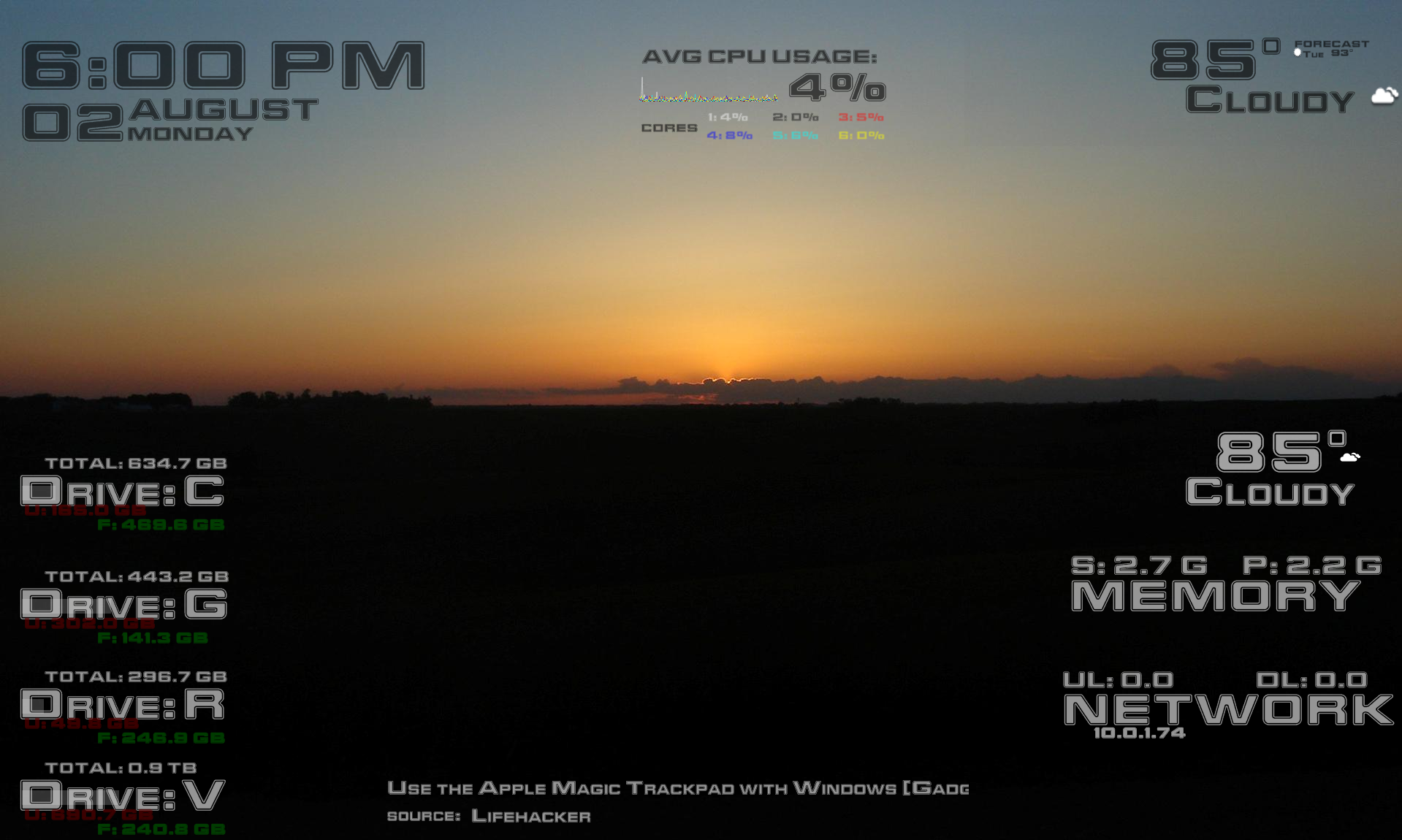
this is my 10Foot HUDs rainmeter skins.
i've used a similar style and added a few more components.
In black and white versions for each. Enjoy!
Components:
--includes red alert font
-Clock/Date
-CPU usage/histogram (multi-core support, up to 6)
-News/RSS headlines
-Memory (swap/phys)
-Weather (basic and forecast versions)
-Network (ip, up/down)
-Hard Drive (total, free, used; included several, easy to duplicate)
CUSTOMIZE NOTES:
[Clock/Date Skin and 12HR to 24HR format]
-for 24 hour time:
--replace the %#I from measuretime below to %#H
--also remove %p (removes am/pm)
[Weather Skin]
-used code for Yahoo weather! much easier, 2 formats now too: basic current or current+nextday (see preview)
-to fix problems w/multimonitor displays (refreshing rainmeter causes all skins to move to main monitor), you need to add @2 after the WindowX and WindowY variables/settings in the rainmeter.ini
ie:
[myHUDs\CPU]
Active=2
WindowX=1535@2
WindowY=433@2
_____________________
-8/2/2010:
-reworked weather code, icons now work locally w/o enigma skin
-added multicore support, will show avg of cpu usage and each core along w/each core on a line graph
-used further variables to make customizing easier
-6/2/2010:
-added variable to drives to make easier to add new
-added link to drive skin to open windows explorer to root of drive when clicking drive letter (ie C)
11/8/2009:
-revamped using a red alert font (included in skin, required to look right)
-used yahoo parsing code for weather
-changed to green histogram for cpu usage (easier to read)
-adding weather condition icons based off of other code found
-cleaned up all skins
-fixed padding/space for conditions in weather
7/27/2009:
-updated all fontface tags to point to variable at top of .ini (makes for easier tweaking, font changing )
7/14/2009:
-updated weather skin again; corrected for xxx and xxx conditions
-updated
7/7/2009:
-WEATHER.com changed xoam feed. updated to use RSS feeds instead weather mod fixed!
-all item fonts are now same opacity across black and white themes
1/12/2009:
-added Harddrive usage w/red and green for free/used space (easily can add more to monitor)
-cleaned up and made all pieces consistent
i've used a similar style and added a few more components.
In black and white versions for each. Enjoy!
Components:
--includes red alert font
-Clock/Date
-CPU usage/histogram (multi-core support, up to 6)
-News/RSS headlines
-Memory (swap/phys)
-Weather (basic and forecast versions)
-Network (ip, up/down)
-Hard Drive (total, free, used; included several, easy to duplicate)
CUSTOMIZE NOTES:
[Clock/Date Skin and 12HR to 24HR format]
-for 24 hour time:
--replace the %#I from measuretime below to %#H
--also remove %p (removes am/pm)
[Weather Skin]
-used code for Yahoo weather! much easier, 2 formats now too: basic current or current+nextday (see preview)
-to fix problems w/multimonitor displays (refreshing rainmeter causes all skins to move to main monitor), you need to add @2 after the WindowX and WindowY variables/settings in the rainmeter.ini
ie:
[myHUDs\CPU]
Active=2
WindowX=1535@2
WindowY=433@2
_____________________
-8/2/2010:
-reworked weather code, icons now work locally w/o enigma skin
-added multicore support, will show avg of cpu usage and each core along w/each core on a line graph
-used further variables to make customizing easier
-6/2/2010:
-added variable to drives to make easier to add new
-added link to drive skin to open windows explorer to root of drive when clicking drive letter (ie C)
11/8/2009:
-revamped using a red alert font (included in skin, required to look right)
-used yahoo parsing code for weather
-changed to green histogram for cpu usage (easier to read)
-adding weather condition icons based off of other code found
-cleaned up all skins
-fixed padding/space for conditions in weather
7/27/2009:
-updated all fontface tags to point to variable at top of .ini (makes for easier tweaking, font changing
)7/14/2009:
-updated weather skin again; corrected for xxx and xxx conditions
-updated
7/7/2009:
-WEATHER.com changed xoam feed. updated to use RSS feeds instead
weather mod fixed!-all item fonts are now same opacity across black and white themes
1/12/2009:
-added Harddrive usage w/red and green for free/used space (easily can add more to monitor)
-cleaned up and made all pieces consistent
© 2009 - 2024 theseamonkey420
Comments35
Join the community to add your comment. Already a deviant? Log In

Your weather part has stopped working, the Yahoo url is no longer valid.